
© 2025 Mister Saad | All Rights Reserved

Dubai Marina

Native vs Cross-Platform App Development: A Practical Comparison for Growing Businesses
Native or cross-platform? That is the first big decision in any app project. And it shapes everything after it. Cost. Speed. Performance. Even how updates work. This guide compares native vs cross-platform app development heading by heading, so you can see both sides of every point before you choose.
Each section below takes one point and shows you the native side first, then the cross-platform side. No approach wins every time, honestly. The right choice depends on your budget, your timeline, your users, and what the app must do. So. Let us compare them, one by one.
1. What Each Approach Means
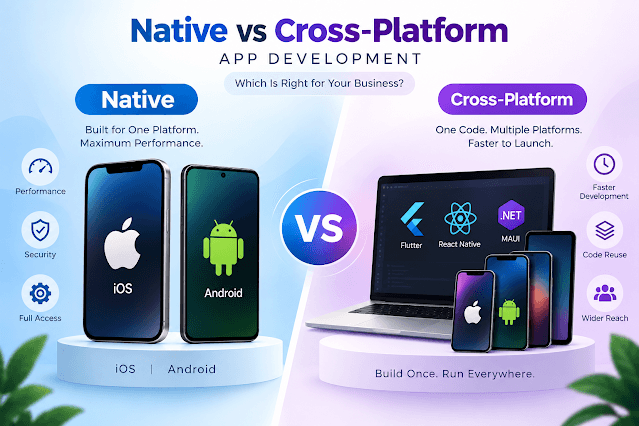
Native means building separately for each platform. One app for iOS, written in Swift. One app for Android, written in Kotlin. Each version uses the platform's own tools, its own design rules, its own store. The result? An app that feels like it belongs on the phone. Fast. Smooth. Familiar. Buttons behave the way users expect. Animations feel natural. Nothing feels translated. Apple handles iOS distribution through App Store Connect, where you manage product pages, testing, and releases in one place.
Cross-platform means one codebase, two stores. You write the app once, and it runs on both iOS and Android. One team. One set of fixes. One release cycle. For a growing business, that is a serious advantage. Less code to maintain. Faster updates. A smaller team can do the job. The app reaches both audiences without doubling the work. The trade-off? A shared codebase. Some features still need platform-specific work.
2. Frameworks: The Tools Behind the Choice
Native teams rely on each platform's own tools first. Swift and Xcode for iOS. Kotlin and Android Studio for Android. They add libraries for analytics, payments, and testing, but the core stays platform-specific. That gives full control. Full access to new features the day they launch. The catch? Your team must know two platforms deeply. Not one. Two.
Cross-platform teams rely on frameworks. Modern app development frameworks let one team write code that runs on both platforms, sharing most of the logic while keeping the interface native where it counts. The best-known options each have their fans and trade-offs. So pick the one your team knows best. A familiar tool beats a fashionable one, every time. Ask your developers what they have shipped with it.
3. Cost Comparison
Native usually costs more. Why? Because you build twice. Two codebases. Two test cycles. Two sets of fixes. Two teams, or one team doing double work. Either way, the bill grows. For a startup watching every dollar, that difference can decide the whole project. The higher cost buys polish and performance. But it repeats with every update.
Cross-platform usually costs less upfront. One codebase. One team. One testing cycle. The savings are biggest at launch, when you build once and ship to both stores. But watch the fine print. Platform-specific fixes, camera, payments, and push notifications can narrow the gap. Get a breakdown by phase before you sign.
4. Speed and Time to Market
Native takes longer to reach the market. You build the app twice and test it twice. The result can feel more polished from day one, which matters if first impressions decide your launch. But every week spent building is a week your competitors are learning from real users. That is the real cost of waiting.
Cross-platform often reaches the market weeks earlier. You build once and ship twice. That early launch buys real user feedback while the app is still young. A fast launch with a rough app teaches you more than a perfect app that ships six months late. If learning fast matters more than looking perfect, cross-platform wins this point. Hands down.
5. Performance and User Experience
Performance is where native apps shine. They run directly on the device, with full access to hardware, graphics, and system features. Games. Video. Maps. Heavy animations. Native handles them smoothly. And the experience follows each platform's rules naturally. iOS users get iOS patterns. Android users get Android patterns. Nothing feels translated.
Cross-platform apps have caught up a lot, and most business apps feel fine. But when the app pushes the hardware hard, the gap shows. And the experience can feel slightly off. A button that looks a touch different. An animation that lags a beat. Users rarely name the problem. They just feel it. An experienced Mobile App Developer in Dubai can help you judge whether your users will notice.
6. Maintenance, Updates, and Long-Term Costs
Native doubles maintenance. Two codebases. Two updates. Two test cycles. Every single time. Bug fixes. New features. New OS versions. Security patches. Everything happens twice. Over two or three years, that adds up to real money. The upside is independence: an iOS problem never blocks your Android users.
Cross-platform updates once, and both stores get the fix. That single update cycle is the biggest long-term saving. But frameworks shape maintenance too. The app development frameworks you choose today decide how easy updates are tomorrow. A framework with a large community means faster answers, more plugins, and easier hiring. A framework that fades means expensive rewrites later.
7. Measuring Success After Launch
Native apps can track the same information as any other application. For example: what screens people go to; where people stop using your product; and what parts of your product people seem to enjoy most. In fact, download numbers provide very little insight into how well your app is doing. Before you launch your app, it is important to set up an analytical system so that you can begin collecting data immediately. The initial data will help shape the next version of your app. Many native development teams use platform-specific analytical tools. This allows them to collect detailed information about each platform separately.
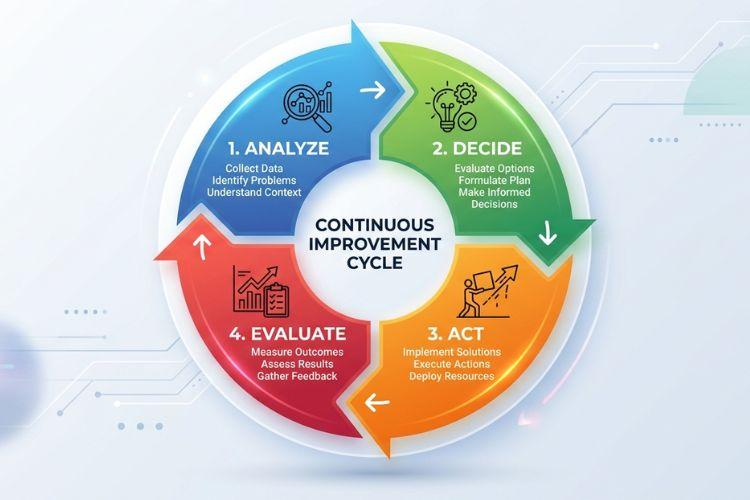
Cross platform apps use the same method of measurement, so with a common analytics tool, it's simple to compare. Tools like Analytics for Firebase log events and user behavior so you can see what actually happens inside the app, on both platforms at once. Track sign-ups, purchases, and crashes in one place, then fix what the data shows. Measure weekly in the first month. The fastest improvements come from the first hundred users.
8. Which Approach Fits Your Business?
Native is best used when performance is the top priority; when an app is complex; when most of the user base exists on only one platform (e.g., games, video editing software, mapping applications) and the application requires a great deal of hardware use. Native is the best option if the primary objective of your application is speed and quality.
Go with cross-platform if you're looking at a budget and/or have time constraints. If the app is relatively simple. If you want to get into both app stores quickly. Business apps. Booking apps. Content apps. Cross-platform works well for all of these types of apps. Many small businesses begin by using cross-platform development, and then migrate to native development for those portions of the app where native development will provide better performance. This type of hybrid approach is far more common than many people realize.
9. Common Mistakes When Choosing an Approach
The first major native error? To select it as a result of habit or because you did not check if the application required it. Teams will often develop a single application twice when they could have developed a single version, and then spend twice as much maintaining both versions over several years. A second error is to separate the team too early, until the two versions begin to appear to be two separate applications. Maintain a single product vision even though there are two codebases.
The biggest mistake when developing across multiple platforms is thinking that by using a single codebase you will have no additional platform-related tasks. For example, you may need to develop platform-specific features such as the camera, payment systems, and notification systems. A second common mistake is selecting a development environment based upon how popular it is, rather than whether or not your developers are familiar with it. A third mistake is neglecting to implement analytics in your app prior to launching, which can result in you making decisions about your app based on guesswork. It would be wise to evaluate each option objectively, select one, develop it, and then track the success of your decision.
10. Quick Comparison at a Glance
Here is the whole comparison in one place, so you can decide at a glance.
| Point | Native | Cross-Platform |
|---|---|---|
| Cost | Higher, two codebases | Lower, one codebase |
| Time to market | Slower | Faster |
| Performance | Best, full hardware access | Good for most apps |
| User experience | Fully platform-native | Close, small gaps |
| Maintenance | Double work | One update, both stores |
| Team size | Larger team | Smaller team |
| Best for | Games, video, complex apps | Business apps, fast launch |
Conclusion
Which type of mobile app development will you use? Your decision will depend upon your app, your budget, and your users. If you want to develop a fast app that looks great and works perfectly, then go with native. If you are looking for a cheaper option and want to get your app out as quickly as possible, then go with cross-platform. Both options can be successful if the app addresses a user need and you release it in a timely manner. Focus on your users before focusing on the technology.
Make a list of everything the app needs to accomplish. Get several quotes from developers who will provide honest pricing. Then select the development company that provides the most reasonable explanation for their choice. Be realistic about what can be achieved within the timeframe given. Finally, remember that having an app on the market is much better than having a promise of an app on the market.
FAQ's
What is the main difference between native and cross-platform apps?
+Which is cheaper, native or cross-platform?
+Do cross-platform apps perform worse?
+Can I switch from cross-platform to native later?
+How long does it take to build an app?
+What should I ask a developer before choosing?
+







Leave a Reply