

© 2025 Mister Saad | All Rights Reserved

Dubai Marina

Real Estate App Development in Dubai: Property Search, Viewing Bookings and Agent Dashboards
A buyer in Dubai does not start with an agent, they start with a phone, where they search, filter, and save the homes they like, then ask to see one. Good real estate app development Dubai that buyers can rely on builds the whole journey around that habit. The app is not a brochure; it is a search tool, a diary, and a booking desk in one place.
This guide treats the app as a property-sector tool, not a generic feature list. Every screen should help someone find a home, book a viewing, or follow up on an enquiry. The property listing app features that matter most are the ones buyers use every day.
1. What Makes a Property App Different
A property app is not a shop, since buyers do not buy a home in one tap, they compare, wait, and talk to family first. The app must fit that slow decision, letting a buyer save a home, come back a week later, and pick up where they left off. A generic app forgets this; a property app remembers.
The app also serves two sides at once, since buyers want clear listings and quick answers, while agents want real enquiries, not random taps. A good app keeps both sides happy, showing buyers what they need and giving agents the details they need to follow up. When both sides win, the app earns its place on the home screen.
2. Searchable Listings: The Heart of the App
Search is where every journey starts, so a buyer types an area, a price, and a number of bedrooms, and the results should come back fast and feel right. Clear photos, a short description, and the key facts belong on the first screen, since price, size, and location should never hide behind a tap. Strong real estate app development Dubai teams build search around how buyers actually think, not around how a database looks.
Small details make search feel easy, since filters should stay visible while the buyer scrolls, and a saved search should send a gentle alert when a new home matches. The Mobile App UX Design Best Practices guide on the same site explains these usability ideas well, from simple navigation to clear buttons and readable text. Use it as a guide for the listing screens, then shape the property details on top.
3. Map Filters That Help Buyers Decide
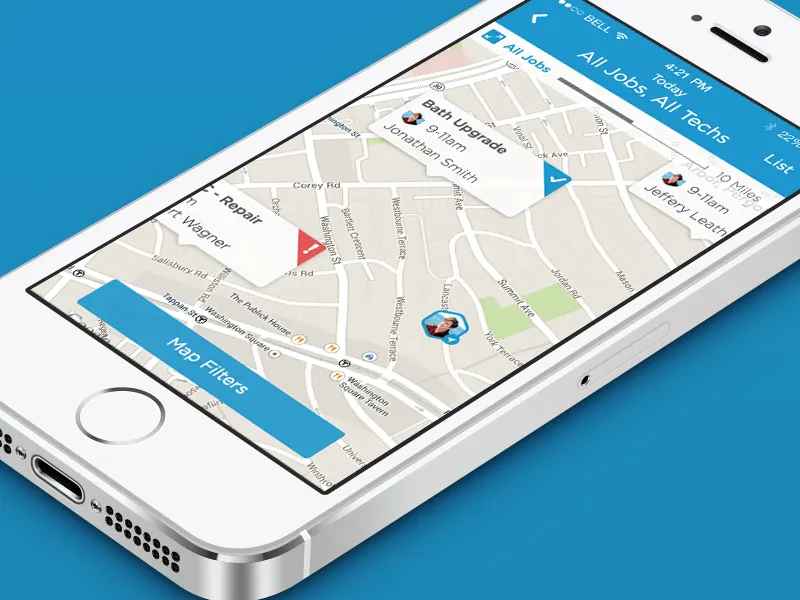
Location decides most property choices in Dubai. A buyer wants to see homes near a school, a metro stop, or the office. A map makes that clear in seconds. Pins should show price and size at a glance, and tapping a pin should open the listing, not a new maze of screens. A real estate mobile application earns trust when the map feels honest and fast.
Filters should work with the map, not against it. A buyer who sets a price range should see only those pins. Keep the filter bar short. Five clear choices beat fifteen confusing ones. A map that respects the buyer's time gets used again and again.
4. Saved Properties and Shortlists
No buyer remembers every home they liked, so saved properties fix that with one tap to save a listing to a shortlist. The shortlist shows the price, the photo, and the last update, and a buyer can compare two homes side by side or share the shortlist with a partner. These are the property listing app features buyers open most, long after the first search.
A shortlist should stay fresh. If a price drops, the buyer should know. If a home is sold, the app should say so, not leave a dead link. A short note under each saved home helps too. Small touches like these turn a saved list into a plan.
5. Viewing Requests and Bookings
The viewing is the moment a listing becomes real, so a buyer should book it in a few taps by picking a day and a time and sending the request. The app should confirm the request at once, and it should also show the agent's name and a way to reach them. A property viewing booking app that hides these details loses the booking.
Reminders matter as much as the booking, since a gentle note the day before helps the buyer plan, and a note an hour before helps them arrive on time. If plans change, the buyer should cancel or move the viewing in the app, since every step should feel easy, because a hard step is a lost viewing.
6. Agent and Admin Roles
An agent needs a different view from a buyer. The agent sees enquiries, viewing requests, and follow-ups in one place, and they can reply fast. An admin sees the whole picture, assigning enquiries, checking response times, and spotting the listings that need better photos, while each role gets only what it needs.
Keep the agent tools simple. A long dashboard with twenty charts helps no one. Show the enquiries that need a reply today. Show the viewings booked this week. Show the listings that have gone quiet. If the app needs a custom build for these roles, a Custom App Developer in Dubai can shape the dashboards around how the agency actually works. The goal is a tool agents open every morning, not one they avoid.
7. CRM Sync and Enquiry Tracking
An enquiry that sits in the app helps no one, so it must reach the agency's CRM at once. The agent should see the buyer's name, the listing, and the message in one place. No retyping, no lost notes. A synced system means a buyer gets a fast reply, and a fast reply means a better chance of a viewing.
Tracking shows what works. Which listings bring the most enquiries? Which areas get the most saves? A property viewing booking app with good tracking answers these questions without extra work. The admin can see the numbers and fix what is weak. A listing with many views and no enquiries needs better photos or a clearer price. Data like this turns guesses into decisions.
8. Notifications That Bring People Back
A buyer who leaves the app may never return on their own, so a well-timed notification can bring them back. A new home in a saved area is worth a message, and so is a price drop on a saved home. Keep the messages short and useful, since one good reason to open the app beats five random ones.
A buyer who leaves the app may never return on their own, so a well-timed notification can bring them back. A new home in a saved area is worth a message, and so is a price drop on a saved home. Keep the messages short and useful, since one good reason to open the app beats five random ones.
9. Documents, Payments, and the Deal
A deal needs more than a chat, so the app should hold the key documents in one place. A floor plan, a payment plan, and the agency's terms should be easy to find. A buyer who can read the documents at home comes to the meeting ready. That saves time for everyone.
Payments need care too, so a booking deposit or a holding fee should be clear, with the amount and the terms in plain words. Never hide a fee in small print. The app should also show what happens next. A clear next step turns a nervous buyer into a confident one.
10. Launch and What Comes After
Launch is the start, not the end, so test the app with real buyers before it goes live. Watch them search, save, and book, since they will find the confusing screens in minutes, so fix those first. A smooth first week matters more than a long feature list.
After launch, listen to the numbers. Which screens do buyers leave? Which listings get saved most? Update the app in small steps. A property app that improves every month stays useful. Keep the team close to the users, and the app will keep growing with them.
Conclusion
A property app works when it feels like a good agent. Clear search, honest maps, easy bookings, and fast replies do the heavy lifting. The real estate mobile application that wins is the one buyers open every day, not the one with the longest feature list.
Start with the buyer, building search first, then saved homes, then viewings. Add the agent tools and the CRM sync once the buyer side works well. An app that grows in that order stays useful. That is the real measure of a good property app.
FAQ's
How many listings should the app show at launch?
+Do buyers need an account to search?
+What makes a viewing booking easy?
+How do agents get the enquiries?
+Should the app show prices?
+How often should the app be updated?
+







Leave a Reply